
The rapid evolution of domestic data management has reached a critical juncture where the average household now generates more information than traditional cloud services can economically store. LincPlus has strategically navigated this shift by pivoting from its origins in the budget laptop and tablet sector toward the specialized network-attached storage market. After establishing a presence with the high-performance, all-SSD N1 and N2 models, the company has introduced the LincStation E1 as a more approachable solution for the broader consumer demographic. This transition signifies a broader industry trend where hardware manufacturers are increasingly prioritizing localized private clouds over third-party subscriptions. By offering a hybrid architecture that accommodates both high-capacity mechanical drives and high-speed solid-state modules, this device attempts to solve the fundamental conflict between storage volume and system responsiveness. It represents a calculated effort to democratize sophisticated storage technology, making it accessible to users who may find professional-grade rack systems too intimidating or expensive for basic home utility.
Compact Engineering and Internal Specs
Structural Design: The Physical Build
The external architecture of the LincStation E1 demonstrates a commitment to functional minimalism that allows the device to blend seamlessly into a modern home office or media center. Constructed from high-quality, durable plastic, the chassis features a sophisticated tool-free access system that simplifies the often-tedious process of internal maintenance. A magnetic cover protects the top of the unit, which, when lifted, reveals two telescopic drive carriers compatible with both 3.5-inch and 2.5-inch SATA hard drives or solid-state drives. These primary bays support hot-plugging, a feature typically reserved for more expensive enterprise-grade hardware, allowing users to swap or upgrade storage without interrupting the system’s power cycle. This mechanical design prioritizes the user experience by eliminating the need for specialized tools or technical expertise during the physical installation phase, ensuring that even novice users can confidently manage their hardware components without risking damage to the delicate internal SATA connectors.
The secondary storage layer is situated on the underside of the appliance, where a non-magnetic panel conceals two M.2 NVMe SSD slots designed for high-speed data operations. Because NVMe drives generate significant thermal energy during sustained read and write tasks, the engineering team integrated a dedicated cooling fan directly above this compartment to maintain optimal operating temperatures. This intentional airflow management prevents thermal throttling, ensuring that the system maintains peak performance even during intensive tasks like high-definition video editing or large-scale file transfers. By placing the NVMe slots in a separate thermal zone from the primary SATA bays, the design effectively manages the different heat profiles of mechanical and solid-state storage. This hybrid 2+2 configuration allows for a versatile storage hierarchy where users can store massive media libraries on traditional hard drives while utilizing the low-latency NVMe drives for the operating system, active applications, or frequently accessed documents that require immediate responsiveness.
Hardware Efficiency: Processing Power and Networking
Beneath the sleek exterior, the hardware strategy has shifted toward an ARM-based architecture that emphasizes energy efficiency and specialized processing capabilities. The system is powered by a quad-core 2GHz Rockchip RK3568 System-on-Chip, which represents a departure from the Intel-based processors utilized in the company’s previous high-end models. This processor is particularly well-suited for a modern storage appliance because it includes a Mali G52 graphics unit and a dedicated 1TOPs Neural Processing Unit designed specifically to handle artificial intelligence workloads. The integration of an NPU allows the device to perform complex tasks such as facial recognition in photo galleries and document categorization without taxing the primary CPU cores. However, users should note that the 4GB of DDR4 RAM is soldered directly onto the motherboard, which limits long-term upgradeability. This fixed memory capacity is a common trade-off in the budget NAS segment, reflecting a design philosophy that prioritizes out-of-the-box stability over future expansion for power users.
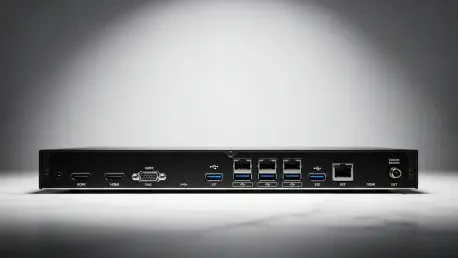
Connectivity options on the production model reflect a pragmatic approach to modern networking, although some high-end features from earlier prototypes were modified for the final release. While early iterations featured a 2.5GbE network port, the final version utilizes a standard Gigabit Ethernet port, which remains the baseline for most residential networking environments. To compensate for this, the device includes integrated dual-band Wi-Fi support, providing installation flexibility for users who cannot easily run physical cables to their router. The external port selection is robust, featuring a high-speed USB-A 3.2 Gen 2 port on the front panel for rapid data ingestion from external drives or cameras. The rear panel provides two additional USB-A 2.0 ports for peripheral devices and an HDMI 2.1 port capable of delivering 4K video at 60Hz. This inclusion of a high-specification video output allows the NAS to function as a direct media player, connecting to a television or monitor to serve as a centralized hub for a localized digital entertainment ecosystem.
The LincOS Experience and Storage Management
User-Friendly Interface: Lowering the Entry Barrier
The most significant software development accompanying the release of this device is the introduction of LincOS, a proprietary operating system designed to simplify the complex world of network storage. Previously, the manufacturer relied on third-party software like Unraid, which, while powerful, often required a steep learning curve that discouraged non-technical users from exploring the full potential of their hardware. LincOS focuses on a streamlined, visual interface that prioritizes ease of use and rapid deployment through a series of intuitive client applications. These applications are available for Windows, iOS, and Android, creating a cohesive ecosystem where the storage device acts more like a personal cloud service than a traditional server. The setup wizard is notably efficient, guiding the user through the process of appliance registration and administrator account creation with minimal friction. This “mobile-first” philosophy ensures that the device can be managed entirely from a smartphone, which aligns with the expectations of modern consumers.
Beyond the initial configuration, the operating system provides a desktop-like environment when accessed through a web browser or the direct HDMI output, offering a familiar workspace for managing files and settings. The interface is designed to be responsive and clean, avoiding the cluttered menus and technical jargon that often plague professional storage software. Users can monitor system health, track storage utilization, and manage user permissions through a centralized dashboard that provides real-time updates on hardware status. This shift toward a proprietary OS allows the manufacturer to optimize the software specifically for the ARM-based hardware, ensuring that the NPU and GPU are utilized effectively for background tasks. By controlling both the hardware and the software, the developers have created a more stable and predictable environment that reduces the likelihood of compatibility issues. This integrated approach is essential for providing a “set-and-forget” experience that appeals to families and small business owners who require reliable data protection.
Data Organization: RAID and Hybrid Storage Logic
Effective storage management is the cornerstone of any reliable network appliance, and the software provides a comprehensive suite of tools for organizing and protecting data. Users have the flexibility to configure their SATA drives into various RAID arrays, including RAID 0 for maximum speed, RAID 1 for simple mirroring, or more complex configurations like RAID 5, 6, and 10 if they utilize external expansion. These protocols ensure that if one drive fails, the data remains accessible and can be reconstructed once a new drive is installed. While the system does not currently utilize the NVMe drives as a traditional read/write cache for the slower mechanical disks, it allows them to be set up as independent, high-speed storage volumes. This logical separation is particularly useful for users who want to host a fast-access file share or a high-speed download directory without being limited by the slower seek times of traditional spinning platters, effectively creating a tiered storage environment within a single compact unit.
The management of these hybrid storage pools is handled through a straightforward disk utility that provides clear visualizations of how space is being allocated across the different physical drives. This transparency is crucial for users who may be mixing different drive capacities or types, as it helps them understand the trade-offs between performance and redundancy. Furthermore, the operating system includes automated maintenance routines, such as disk scrubbing and health monitoring, which work in the background to identify potential hardware issues before they lead to data loss. By automating these technical tasks, the software ensures that the storage environment remains healthy without requiring constant manual intervention from the user. This level of automation is a key differentiator for the device, as it provides the peace of mind associated with professional data centers while maintaining a level of simplicity that is suitable for a household environment where technical support is rarely available.
Smart Functionality and Real-World Performance
AI-Driven Tools: Enhancing the User Experience
The integration of a dedicated Neural Processing Unit within the chipset enables a variety of intelligent features that distinguish the device from traditional budget-friendly storage solutions. One of the primary applications of this AI capability is the Smart Album feature, which automatically scans and categorizes photo libraries using advanced facial and object recognition algorithms. This allows users to search for specific people or items within their personal collections without having to manually tag thousands of images. Similarly, the Smart Library tool provides full-text search capabilities for indexed documents, allowing the system to locate files based on their internal content rather than just the filename. These tools transform the NAS from a passive storage bin into an active digital assistant that helps users navigate their growing archives of personal and professional data. By processing these tasks locally on the hardware’s NPU, the system ensures that user privacy is maintained, as no data needs to be sent to external cloud servers for analysis.
Security is another area where the software leverages the hardware’s capabilities to provide robust protection for sensitive information. The Secure Space feature allows users to create hardware-encrypted partitions that are isolated from standard network sharing protocols, requiring a specific password or authentication key for access. This is particularly valuable for storing financial records, legal documents, or private communications that require an extra layer of protection beyond standard user permissions. Additionally, the operating system supports granular backup and synchronization tools that can be configured to protect data across multiple devices. The Backup Disk tool allows for automated data redundancy from mobile phones and PCs, with specific controls that can restrict operations to Wi-Fi networks to save mobile data. These features work together to create a secure, intelligent ecosystem where data is not only stored safely but is also organized and protected through a combination of local AI processing and professional-grade encryption standards.
Speed Benchmarks: Assessing Network Throughput
Performance evaluations of the hardware indicate that the primary limiting factor for data transfer speeds is the Gigabit Ethernet interface, which is a common characteristic of devices in this price category. During sequential read and write tests using a RAID 1 configuration of 4TB mechanical drives, the system consistently achieved speeds of approximately 110MB/sec and 99MB/sec, respectively. Interestingly, when the same tests were performed using a RAID 1 mirror of high-speed NVMe SSDs, the results remained nearly identical, with read speeds holding at 110MB/sec. This confirms that the internal bus and processing power are more than capable of handling high-speed data, but the external network connection acts as a physical ceiling for how quickly that data can be moved across a wired network. For most home users, these speeds are perfectly adequate for streaming 4K video, performing daily backups, or sharing office documents, as they represent the maximum throughput possible on a standard 1Gbps home network.
In practical, real-world scenarios involving the transfer of large files, the device maintained a steady performance that saturated the available bandwidth without significant fluctuations. Transferring a 25GB media file resulted in average speeds ranging between 98MB/sec and 100MB/sec, demonstrating the stability of the Rockchip SoC under sustained loads. When tasked with moving thousands of smaller files, such as a large folder of photographs or code repositories, the throughput dropped to roughly 52-54MB/sec, which is an expected behavior caused by the overhead of managing individual file headers. Despite these modest networking specs, the inclusion of the HDMI 2.1 port provides a workaround for high-bandwidth tasks, as users can play media directly from the device without relying on the network at all. This combination of reliable network performance and direct playback capabilities ensures that the device remains a versatile tool for various household and small business applications, even if it does not target the extreme speed requirements of professional video production environments.
Market Positioning: Looking Toward Future Utility
The LincPlus LincStation E1 emerged as a compelling disruptor in the competitive entry-level storage market by offering a unique balance of hardware versatility and software simplicity. At an expected retail price of roughly £190, it positioned itself as one of the most affordable four-bay hybrid solutions available, providing a significant value proposition for those transitioning away from subscription-based cloud storage. While the decision to utilize a Gigabit port was a notable compromise, the inclusion of dedicated AI processing and a modern, proprietary operating system provided a degree of future-proofing that outweighed the networking limitations for the average consumer. The device successfully addressed the needs of a growing demographic that required a “set-and-forget” appliance for media hosting and automated backups. It proved that sophisticated data management did not have to be accompanied by a prohibitively high price tag or a requirement for advanced networking infrastructure, making it a practical choice for localized data sovereignty.
Looking ahead, the success of this platform depended largely on the continued evolution of the LincOS ecosystem and the manufacturer’s commitment to software updates. As the development team integrated planned features such as an AI-powered assistant and improved web management tools, the hardware’s NPU became increasingly valuable. The E1 served as a foundational piece for users building a private digital infrastructure, offering enough performance to handle the demands of a modern connected home while remaining efficient and quiet enough for tabletop placement. For those considering their first step into the world of network-attached storage, this model offered a low-risk entry point that did not sacrifice essential features like RAID redundancy or mobile accessibility. It demonstrated that by focusing on the core needs of the household user—privacy, ease of use, and hybrid storage flexibility—a manufacturer could create a product that remained relevant even as the broader technological landscape continued to move toward more complex and data-heavy environments.